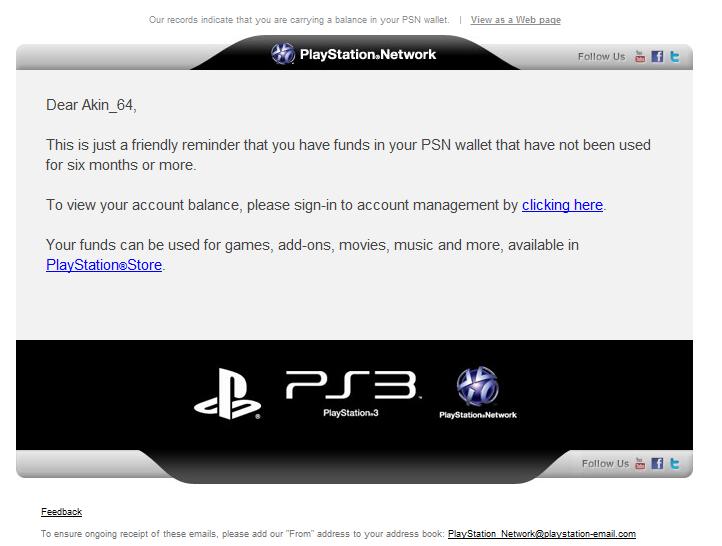
There are reports of phishing emails being sent to PSN users, so if you encounter any one email that looks like this, please avoid it. It can result in you losing your login details or your credit card details being misused.
Do not reset your password using any of these emails. I repeat. Do not reset your password.
Check out the mail below:
Thank you for contacting us regarding the email you received regarding unused funds in your PlayStation®Wallet. The message you received was not sent by a representative of Sony Computer Entertainment America (SCEA). I apologize for the inconvenience and concern that this has caused you.
If you have clicked on any links included in the email or have replied to the email, we also recommend that you immediately change your PlayStation Network account password by following the steps outlined below:
In order to change your password on your PlayStation 3 system, please follow the steps outlined below:
– On the XMB™, go to the PlayStation Network icon.
– Choose, “Sign In”.
– Enter your Sign-In ID (email address).
– Select, “Forgot Password” and press the X button.
– Enter your Sign-In ID and Date of Birth, select the on screen “Continue” button and press the X button.
– Select the “Confirm” button and press the X button.
– You will receive an email with a link that will allow you to change your password within 24 hours.
If you are unable to locate the Forgot Password Link, please follow the steps outlined below:
– On the XMB™ go to the PlayStation Network icon.
– If you see “Account Management” press the triangle button and turn off the “Auto Sign In” feature.
– Next, select “Sign Out”.
– Go back to the PlayStation Network icon and follow the steps above.
I know that by deleting this message without clicking on any links contained in the message and reporting the person who sent the message will keep your PlayStation Network account secure. Resetting your password is just a precaution. I would like to thank you for giving me the opportunity to assist you. If you have any further questions and/or concerns regarding this or any other issue you may have with any PlayStation® product, please email us again.
Regards,
<<<<