GamingBolt

Dark Light
Freezing issues on the PS3: Firmware 3.10 to the rescue
-

We have been hearing about the freezing issues that have plaguing some of the PlayStation 3’s system. But with the recently released Firmware 3.10, all your freezing issues are directly send to Sony. Its not sure what kind of data or information is actually transferred to Sony, but what is guaranteed is that your PSN account information, contents saved on your PS3 and your email address will be sent to Sony if in use during the time the problem occurs. Here is the screen shot of the process:
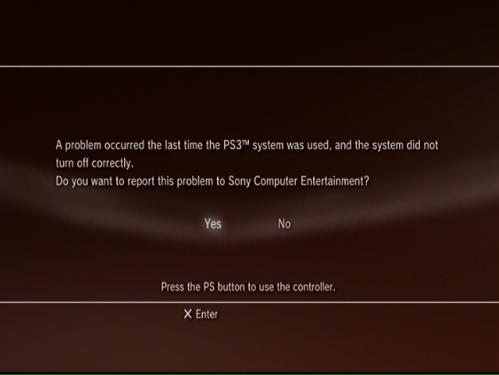

freeze

17 Comments
  • tyler
    November 21, 2009
    Reply #1

    my ps3 has frozen multiple times since the 3.1 firmware update always while loading but i haven’t seen the message to send the error to playstation

  • corey
    November 24, 2009
    Reply #2

    Ive had my 120gb ps3 slim freeze a couple of times while loading since 3.10, once it reset my video settings after freezing, Also my controller wont say synced with system, have to re-sync it every couple of days. I have seen the screen shot above 4 or 5 time now since updating to 3.10

  • John Weber
    November 30, 2009
    Reply #3

    After downloading the latest firmware 3.10, my controller doesn’t stay in sync with the latest firmware 3.10. The XMB software doesn’t notice the controller at start up’s.

  • Gee
    November 30, 2009
    Reply #4

    My PS3 has died since the 3.10 updated. It worked fine before but now it will not load games or DVDs, it does see them in the drive but just freezes when they try to load. Hard drive is fine as I can see picture and hear music. Can contact friends via mails.

    The system update section of the PS3 crashes the PS3, should tell you if your PS3 needs updating or not yet this crashes my PS3. Sony say that firmware does not kill console I say they should listen to the customers that have downloaded the update and can no longer use their consoles… like me!

    I think Sony had to recall the firmware update 2.4 as it caused issues to a number of consoles. Maybe they should think about this as I’m struggling to see how updating the firmware which kills my PS3 is my fault?

    I was offered £99.00 fix. I say no as it was down to the firmware, I explained the symptoms and they asked to see the console and said if it was corruption down the update then they would not charge, a few days later They call and say it is corrupt and they can not fix it so it will be £128.00 swap. LOL

    Why would I pay £128.00 for a reconditioned PS3 (that was more then likely killed by a firmware update) when I can buy a new one for £200.00?

    Just think the next time you update your PS3 it could be the last. I hope this is not happening to lots of people as it really is shocking, however if it is happening to you please let us all know.

    Do Xboxes have this issue????

  • Benjamin B.
    December 2, 2009
    Reply #5

    dude i feel your pain, my non-refurbished 60gb ps3 doesnt read discs after the new 3.1 update, so i bought i new one in the mean time while my 60gb gets repaired. now i had to update the new 120gb slim and the fucking controllers wont connect!!!! this firmware is BULLSHIT!!! i have to plug them in if i want to play and it feels really akward playing three feet away from a 40inch tv. anybody else have these problems? let me know, i want to start a petition for sony to fix our broken systems

  • Moe
    December 3, 2009
    Reply #6

    I am having the same problem… I am so pissed!!!! cant play my cod 4 mw 2!!! LIKE how can a update screw ur ps3! I think they did it on purpose so u can buy the new ones :*( Mine freezes every 2 minutes.. I swapped out the hard drives and IT was working fyne for 2 days and THAN AGAIN :( its doing the same thing..

  • Moe
    December 5, 2009
    Reply #7

    I HAVE GOOD NEWSSSSSSSS! I have solved the issue!!! played my game for 30 minz so far without the ps3 frezzeingg!!! I hope this helps everyone else!!! download the update from ps3 website the 3.1 and put it in a usb and it tells you to create two new folders in capital letters first one “PS3″ and within that folder create “UPDATE” and have the update file in that folder… I used a usb drive.. now go to safe mode and click on last option system update! and it should start installing the software all over!

  • James
    December 5, 2009
    Reply #8

    Moe could you’ve a little clearer with the last 2 sentences in your instructions. What is safe mode? I’d like to try your method but I wanna be 100% sure about what I’m doing.

  • Moe
    December 6, 2009
    Reply #9

    ok for safe mode.. the ps3 has to have the light red so turned off.. now hold the power button and you will hear the beep and the ps3 light will turn from green to red in like 10 seconds.. and turn off again and now hold the power button again this time you will hear one beep than another one beep and than two beeps after those two beeps let go of the power button and now on ur screen it will give you options 1-6 and i think it was 6 to update system and than click on using storage device..

  • James
    December 6, 2009
    Reply #10

    Thanks a lot!! So far so good. I really appreciate the help. I have a 60 gb model and really didn’t wanna trade it in.

  • James
    December 6, 2009
    Reply #11

    Nope. Still freezing. Gamestop here I come. Unless Sony come with a fix before saturday

  • rey
    December 7, 2009
    Reply #12

    hey boys is it safe to download?

  • rob
    December 29, 2009
    Reply #13

    my ps3 stated freezing after the update aswell, started on cod mw2 in the online mode after every game finished, now it wont load up any games and if it does it freezes just after you start playing. this is bullshit no point buying another one cause obviously the same thing is gonna happen as soon as it is updated. i have tried doing a backup and restoring back to factory settings even did the rebuild database thing but the problem is still there.

  • Tim
    February 3, 2010
    Reply #14

    Well… screw it I am too scared to try all that. I will just use the internet and all of my online game through my PC, and not risk losing my PS3. I love all the advise, but I am too chicken and I am not going to let Sony win this silly battle.

  • tomek
    February 6, 2010
    Reply #15

    I am experiencing the same problem. What a load of crap. Why pay $150 dollars where they probably
    Don’t replace anything was thinking about buying a new one but why waste the cash only
    To fuck yourself twice. Sony needs to fix this since their the ones at fault.

  • Eric
    February 7, 2010
    Reply #16

    Don’t know if I am experiencing freezing from an update or not, but I started up MAG a couple days ago and it said there was an update. Yesterday the system froze during the game and then was freezing when turning the system on. After turning it completely off for a day and spraying all the vents with compressed air, system and MAG played fine for about an hour and a half then froze again.

  • [kevo]
    March 6, 2010
    Reply #17

    i‘ve had my ps3 slim 120gb since late dec, early jan. i had no issues, but last night i was playing white knight chronicles and after a couple hrs my game froze with music still playing! the ps button wouldn’t work, so i had to manually shut it off. i did get the sony notification telling me to report it. it freezes everytime i try to load an anime on http://www.animeseason.com and i’ve yet to test out how long i could play to see if it will even freeze. funny thing is, i loaded this forum through a google search and have been on it for 15-20min with no problems… hopefully it goes away or sony fixes it before final fantasy!!!!

Leave a Reply.
We are looking for News Editors. Interested candidates please contact us here


Login


Latest Comments Our Partners
Latest Reviews Latest Previews Polls

Will you buy Heavy Rain?

View Results

Loading ... Loading ...