





Grand Theft Auto 5 PC Graphics Options And Settings Revealed

GTA 5 on PC is shaping up to be a fantastic console port.

Posted By | On 08th, Apr. 2015

GTA 5 PC

The PC gaming community has been crazy hyped for the PC build of the popular open world action game, Grand Theft Auto V which will soon be available on April 14th. One of the things that they’ve been waiting on, are a list of graphical options, because the PC gaming scene is big on visual customisation.

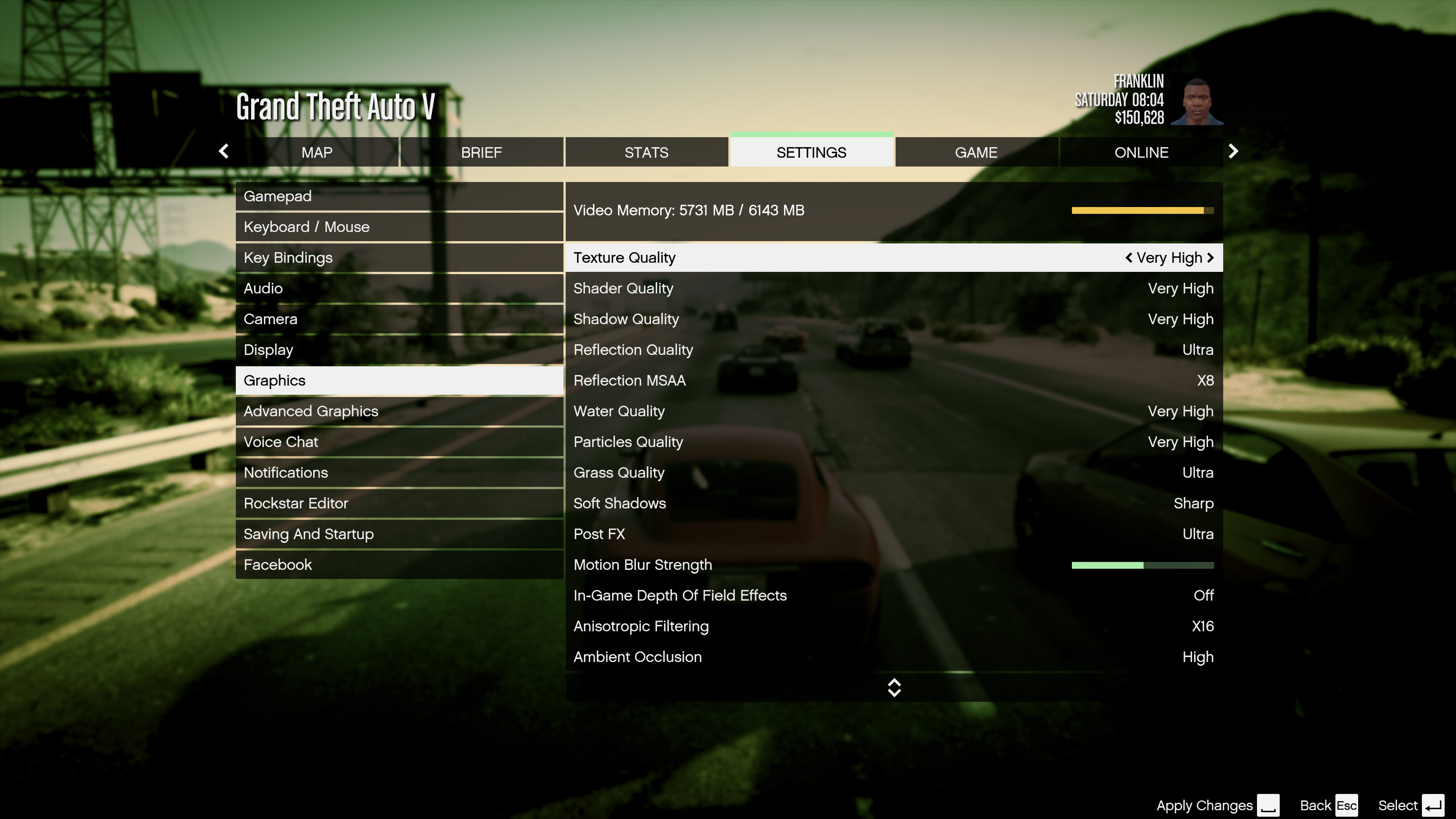
We now have the extensive list of graphical options that can be found in the game and it’s a fantastic list. This is partially where the idea of the PC Master Race came from. Underneath the Advanced Graphics tab, you can find options for Long Shadows, High Resolution Shadows, High Detail Steaming While Flying options as well as further distance scaling bars.

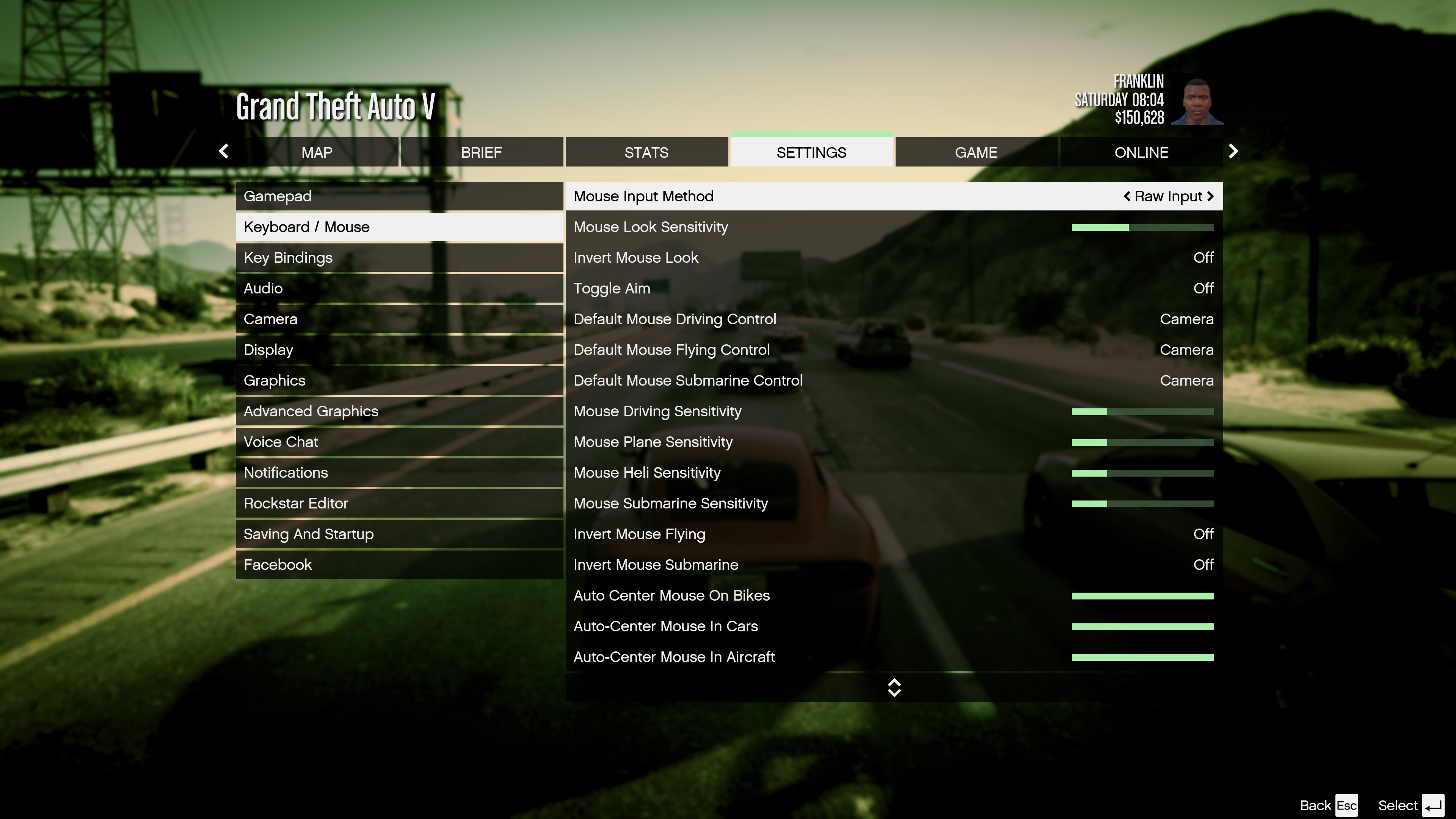
Check out the full settings below along with screenshots. The game is now available for pre-load on Steam and it weighs a mammoth 65 GB. The game is already available on PS4, Xbox One, PS3 and Xbox 360.

Grand Theft Auto V on PC Supports:

  • A Video Memory Slider to adjust how much video memory your using
  • Ignore Suggested Limits options will scan your rig and give a preset option that you can choose to ignore and change
  • DirectX Version Output monitor: 1-3
  • Anti-Aliasing options that include FXAA, MSAA and even Nvidia’s TXAA
  • Scaling bars for population density, the variety of the populace and distance scaling
  • Texture quality goes from normal to high
  • Shader quality goes from normal to high
  • Shadow quality goes from normal to high
  • Reflection quality goes from normal to high
  • Reflections support MSAA
  • Water quality can scale from normal to high
  • Particle quality goes from normal to high
  • Soft Shadow options scaled from Softer, Softest AMD, CHS, Nvidia PCSS
  • Motion blur, thankfully, can be scaled up and down, no details regarding whether or not it can be entirely turned off
  • There are depth of field effects that can be turned on and off
  • Anisotropic filtering goes up to X16
  • There are various ambient occlusions
  • There are various tessellation options

Grand Theft Auto 5 PC Graphics Options And Settings Revealed

Grand Theft Auto 5 PC Graphics Options And Settings Revealed

Grand Theft Auto 5 PC Graphics Options And Settings Revealed

Grand Theft Auto 5 PC Graphics Options And Settings Revealed


Keep On Reading!

The Legend of Zelda: Ocarina of Time Remake Review – Masterclass

The Legend of Zelda: Ocarina of Time Remake Review – Masterclass

The Legend of Zelda: Ocarina of Time Remake's new visuals and great performance make this a beautifully paced ...

Phantom Blade Zero vs. Onimusha: Way of the Sword – Which Delivers the Better Adventure?

Phantom Blade Zero vs. Onimusha: Way of the Sword – Which Delivers the Better Adventure?

Two masters of the blade and two combat systems that give them everything they need to succeed with style and ...

The Legend of Zelda: Ocarina of Time Remake Guide – 15 Essential Tips and Tricks

The Legend of Zelda: Ocarina of Time Remake Guide – 15 Essential Tips and Tricks

If you’re thinking about diving into a very welcome dose of nostalgia blended with the magic of modern tech,...

Crimson Desert: Charting the Unknown Goes Big, Then Keeps Going

Crimson Desert: Charting the Unknown Goes Big, Then Keeps Going

I always knew the ocean was a vast place, but it took Pywel opening up its shores to make me realize just how ...

Lightyear Frontier 1.0 Review – Relaxed Repetition

Lightyear Frontier 1.0 Review – Relaxed Repetition

Lightyear Frontier is a cozy farming game that also happens to involve some automation and a mech. Here are ou...

The Legend of Zelda: Ocarina of Time Remake Is an Adventure You Never Want to Leave

The Legend of Zelda: Ocarina of Time Remake Is an Adventure You Never Want to Leave

Nintendo retains the core of the classic while leveraging improved visuals and quality-of-life features to mak...